 By Mark WhiteOwner & Executive Producer, DFW Live Stream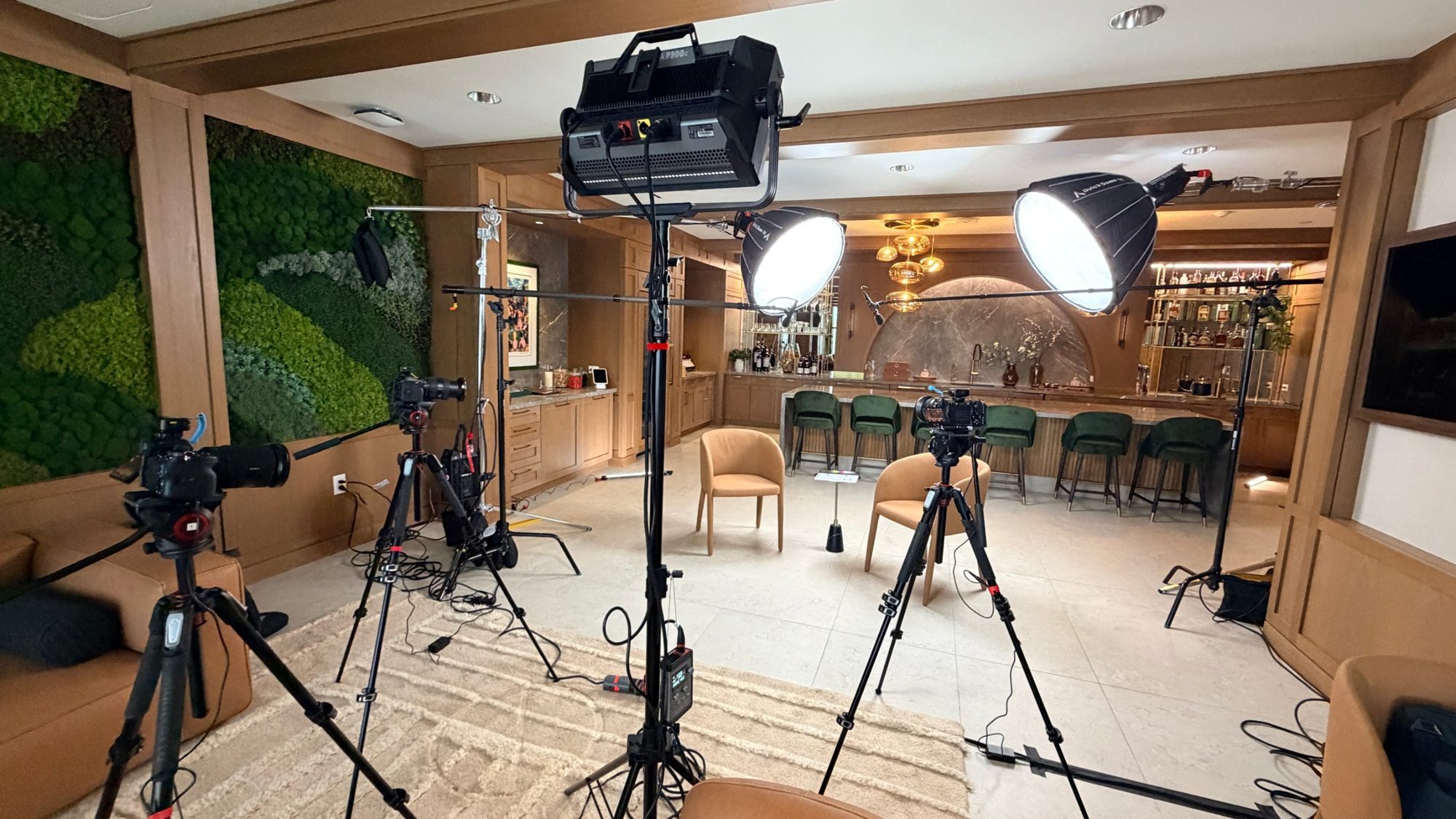
Last week we set up a three-camera video podcast shoot in a client's office in a Dallas high-rise. Not a studio. Their office kitchen, which sounds like a terrible idea until you walk in: a long bar with green velvet stools, a marble arch, warm pendant lights, and a living moss wall down one side. It made a better backdrop than most sets I've built. The client's guest was flying in, their editor was waiting on the files, and nobody wanted it to look like two people talking on a laptop.
I get asked about this kind of job more now, and it's a different animal from the multi-camera live production work we do most days. So here's the whole setup, what every piece was doing, and what I'd tell you if you're thinking about producing an interview video or a podcast for your own YouTube channel.
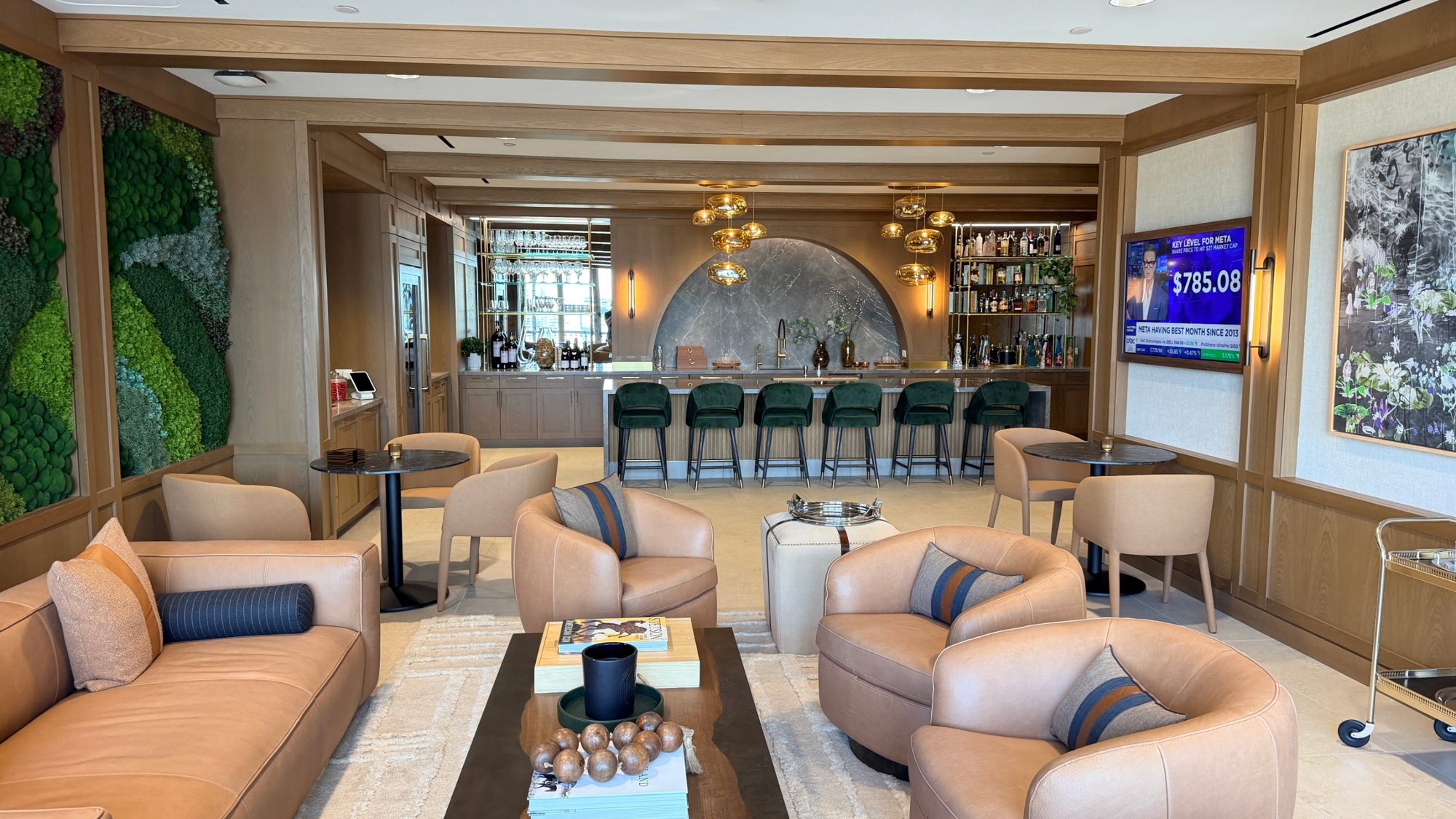
Most of the podcast and interview video production I see in Dallas happens in a rented studio. That works. But a lot of businesses want it at their own location, in their own space, with their own brand on the wall. The tradeoff is you have to bring the studio with you and make the room behave.
Before any of that, we built the entire rig in my own living room the week before and ran it like a show: lights on the booms, both mics into the recorder, three cameras rolling with timecode.
The day you find out a cable is wrong should never be the day the guest is in the chair.

Our process on this one was two days. Day one was setup and test: we arrived early afternoon, built the whole rig, lit it, recorded a test conversation with two people from their team sitting in, and left everything in place overnight. Day two was the shoot. The host and the guest walked in, sat down, and we were rolling within a few minutes. That overnight gap is the single thing that made the day calm. If you only get one day, plan on the first half of it being setup.
We ran three Sony FX3 cameras. Two of them we own; the third was a rental for the week, about $250, because buying a third body for one shoot is a bad business decision.
The angles were the classic ones. A wide shot covering both people and the room, so the editor always has somewhere safe to cut. Then a single on the interviewer and a single on the interviewee, each framed a little tighter so you can see the person speaking react in real time. That's the whole reason to shoot three cameras instead of one: the editor gets to cut on the moment the guest laughs or the host leans in, instead of sitting on a wide shot for an hour.
Every camera went to a 19-inch Atomos Sumo director's monitor so I could watch all three frames at once and catch a drifting focus or a light flare before it mattered. We shot 4K at 29.97 in S-Log3 because that's what their editor asked for and it gives them room in post. Ask your editor what they want before the shoot, not after.

Sync was timecode on all three cameras and on the audio recorder, so the editor got four sources that line up on the timeline without hunting for a clap. A timecode slate was on the table at around a thousand dollars. Small timecode boxes on each body did the job for a fraction of that. I still clapped a $47 slate at the top of every take as a backup. Never needed it. Still worth the four seconds.
Here's the deal with lighting a conversation in an office. The room already has light, and all of it is wrong. Overhead fluorescents, a window that changes over the course of the afternoon, a screen glowing in the background. Your job is to add enough light of your own that the room's light stops mattering.
We used a cross-key setup. Two lights, one on each side of the set, angled across the table. The light that's the host's key light is also the guest's backlight, and the guest's key is the host's backlight. Each light does two jobs, which is why two people can look fully lit with half the fixtures you'd expect. The key was an Aputure LS 600 through a Light Dome softbox, which turns a hard point source into a big soft one, flown in over the set on Cheetah Stand Heavy Duty Super Booms. Those stands were a pleasant surprise: they hold a heavy light and a softbox exactly where you put them for six hours without creeping. Sandbags on every stand, of course, because a light stand tipping onto a guest ends a shoot.
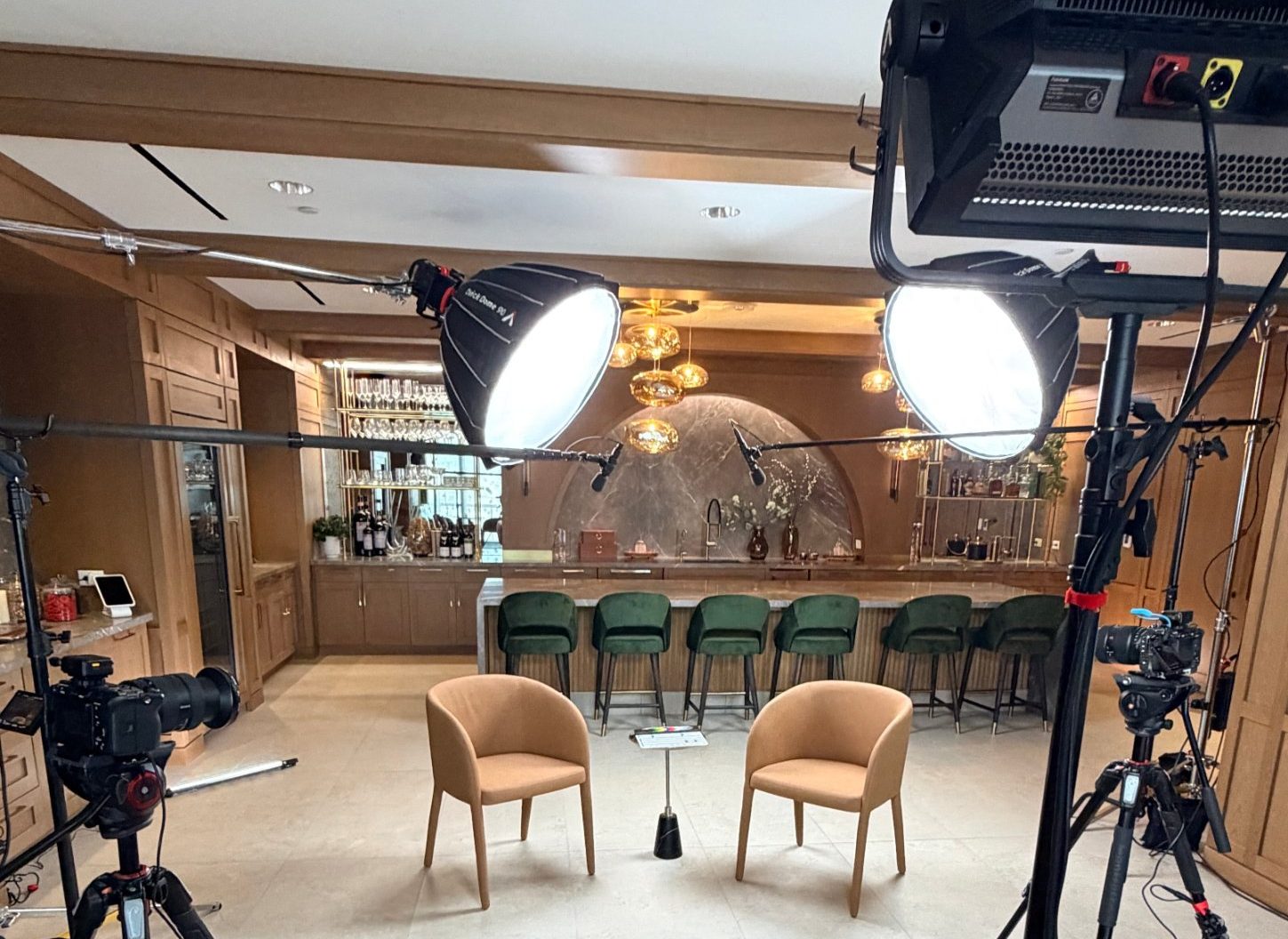
Fill light came from an Aputure Nova panel, dialed down so the shadow side of each face still has shape. Then Godox tube lights in the background for ambient color, which is what makes the shot look like a set instead of a kitchen. If you watch a podcast that looks expensive, half of it is usually that there's a little light on the wall behind the people.
Something I'll be honest about: I bought the LS 600 for this shoot and only ever used it at 5600K, no color at all. The gear you need for a clean interview is less exotic than the gear you'll be tempted to buy.
People upgrade cameras and leave the sound alone, and then wonder why their podcast feels amateur.
Viewers forgive a soft image. They do not forgive audio they have to work to listen to.
We used two Sennheiser MKH 50 microphones on boom arms off C-stands, each one reaching in just out of frame above the person talking. A boom mic on a stand gives you the natural sound of someone speaking in a room, without a lavalier mic clipped to a shirt or a big podcast mic sitting between the two people and blocking the shot.
Both mics ran into a Zoom F8n Pro recorder in 32-bit float, which also provided phantom power. The 32-bit part matters more than it sounds: if the guest suddenly gets loud, the recording doesn't clip. I monitored the whole conversation on headphones and delivered each mic as its own track, so the editor can ride levels per person in post production.
Clean audio is also the part that's hardest to fix later.
You can color-grade a flat image. You cannot un-echo a room.
On this job, our scope ended at capture. We handed over raw card dumps from all three cameras plus the separate audio tracks, uploaded to the client's shared drive, and their team handled the edit and the upload to their channel. No post production on our side.
That's a choice you get to make. Some clients want us to shoot and edit. Some have an editor and just want broadcast-quality source files. The price follows the scope, which is why I won't quote video production off a rate card. For reference, a shoot like that one, a setup day and a shoot day with two of us and everything above, typically runs between $4,500 and $6,000. A single-camera interview video for a case study is less. A recurring monthly program with editing is a different conversation. Every job is scoped on what it actually needs, and on how many days you want to film.
If you run webinars for your business, everything above applies to you. The number one question I get from marketing teams is how to make their webinars look professional instead of like a video call, and the answer is the same three things: a real key light on the presenter, a real microphone off-camera, and a camera that isn't a webcam. You don't need three of each. One good camera, one soft light, one boom or lav into a proper recorder, and your produced webinar jumps a tier.
We do that in our studio and on location. It's the exact same gear, pointed at one person instead of two.
If you're publishing weekly and you own the space, build a permanent set. Lock the lights, mark the camera positions with tape, and never move them. That's a one-time investment and the right move for creators, or for a business where video is a real part of the marketing strategy.
If you're doing a few episodes a year, a launch series, or an interview with someone you're only going to get in the room once, bring in a team. The guest you flew in doesn't get a second take next week.
The cost of a professional shoot is small next to the cost of a one-time conversation you can't use.
Either way, the thing that actually separates a professional interview from a mediocre one isn't the camera brand. It's that somebody tested the whole chain the day before, watched every frame while it was rolling, and listened to every word on headphones. That's the job.
If you've got a shoot like this coming up and want to talk through it, grab a time here. Happy to tell you whether you need us or not.
At minimum, one camera that shoots clean 4K, one soft key light, one microphone per person running into a dedicated recorder, and a way to monitor both picture and sound while you record. For a two-person interview video we use three cameras, two boom mics, a key light and fill light per person, and background lights. The audio recorder and the monitoring are the two pieces people skip, and they're the two that save a shoot.
Scout the room, light it so the room's own lighting doesn't matter, set a wide shot plus a single on each person, put a mic just above each person out of frame, run everything into a recorder and a monitor, and test the whole chain with stand-ins before the real guest arrives. Then deliver synced camera files and separate audio tracks to whoever is editing.
One wide shot that covers both people and the set, and one tighter single on each person, placed so each camera is roughly on the eyeline of the person it's shooting. Keep all three on the same side of the line between the two people so the editor's cuts stay natural. Sync them with timecode on every camera and the audio recorder, or a slate clap on every take if you don't have timecode.
We shoot in offices, conference rooms, and hotel suites all the time. A studio gives you a controlled room; an office gives you your own brand and location in the shot. If we come to you, plan on a few hours of setup, ideally the day before, and a room where you can control the windows.
It depends entirely on scope: number of cameras, whether we edit, whether it's one episode or a recurring program. A three-camera, two-day shoot like the one described above typically runs between $4,500 and $6,000 with the client handling the edit. A single-camera interview is less; a monthly produced program with post production is quoted separately. I'll give you a real number once I know what you're making.
For a seated two-person conversation, boom mics on arms just out of frame sound more natural and keep the shot clean. Lavs are better when people move around or when there's no way to keep a boom out of the shot. On a podcast where the guest might lean back or gesture, a boom follows them without rustling.
Yes. A webinar is an interview video with one person and a live audience. The same key light, off-camera mic, and real camera make a webinar look produced instead of like a video call, which is what our produced webinar service is built around.
Mark runs DFW Live Stream and has been producing corporate livestreams, conferences, town halls and webinars across Dallas–Fort Worth and around the country since 2017. He writes these from the production desk, not a marketing department, and uses AI tools to help draft and structure them. Every post is read, fact-checked and edited by him before it goes live.